Which channel brings your paying customers? Revenue analytics for Razorpay and Cashfree (2026)
Your Razorpay or Cashfree dashboard shows who paid, and your analytics shows who visited. Lantern joins them: revenue in rupees by channel, referrer, campaign, country and landing page, including ChatGPT. Setup takes about ten minutes.
· 15 min read
If you take payments through Razorpay or Cashfree, Lantern is the analytics tool that connects to them directly. Add one webhook, and every captured payment, renewal and refund shows up on your dashboard in rupees. Each one is credited to the channel, referrer, campaign, country and landing page that first brought that customer, with ChatGPT, Perplexity and the other AI assistants as a channel of their own. It also works with Stripe, Dodo Payments, Paddle, Polar and Lemon Squeezy, and it starts at $8 a month after a 7-day free trial with no card.
This guide is for Indian founders and anyone else selling through an Indian payment gateway. It explains why the question "which channel actually makes us money?" is so hard to answer today, what Lantern shows instead, and exactly how to wire up Razorpay or Cashfree. You can open the live demo while you read.

The question your dashboards can't answer
Open your Razorpay dashboard and you'll see every payment: the amount, the method (UPI, card, netbanking), the customer's email and phone. Open Google Analytics and you'll see visits: how many came from Google, from Instagram, from a Reddit thread. Neither will tell you the one thing you need to decide where to spend next week: the Reddit thread sent 300 visitors, and 4 of them paid ₹9,996.
That gap exists because the two halves live in different systems. The payment gateway knows the money but not the visit. The analytics tool knows the visit but not the money. Joining them by hand means exporting both, matching emails in a spreadsheet, and guessing for everyone who didn't sign up with the same email they paid with. Nobody does that every week, so most founders end up deciding on gut feel.
Most founder analytics tools were built for Stripe
The newer analytics tools that do show revenue grew up around the payment providers popular with founders in the US and Europe. DataFast, for example, connects natively to Stripe, Lemon Squeezy, Polar and Dodo Payments. For any other provider, its docs ask you to call its Payment API from your own code when a payment succeeds, which means writing and maintaining a webhook handler yourself. Google Analytics, Plausible and Fathom can record revenue only if you send each purchase from your own code, and none of them reads your Razorpay account.
Many Indian startups can't get a Stripe account at all, and many more choose Razorpay or Cashfree on purpose, for UPI, local cards, netbanking and UPI Autopay subscriptions. Those founders have been left to build the join themselves. Lantern does it for you.
What Lantern shows once your payments are connected
Lantern is web analytics for founders: one dashboard showing where visitors come from, what they read, where they are, and who's on the site right now. Connect a payment provider and the same dashboard gains a revenue layer.
Revenue next to your traffic, in rupees
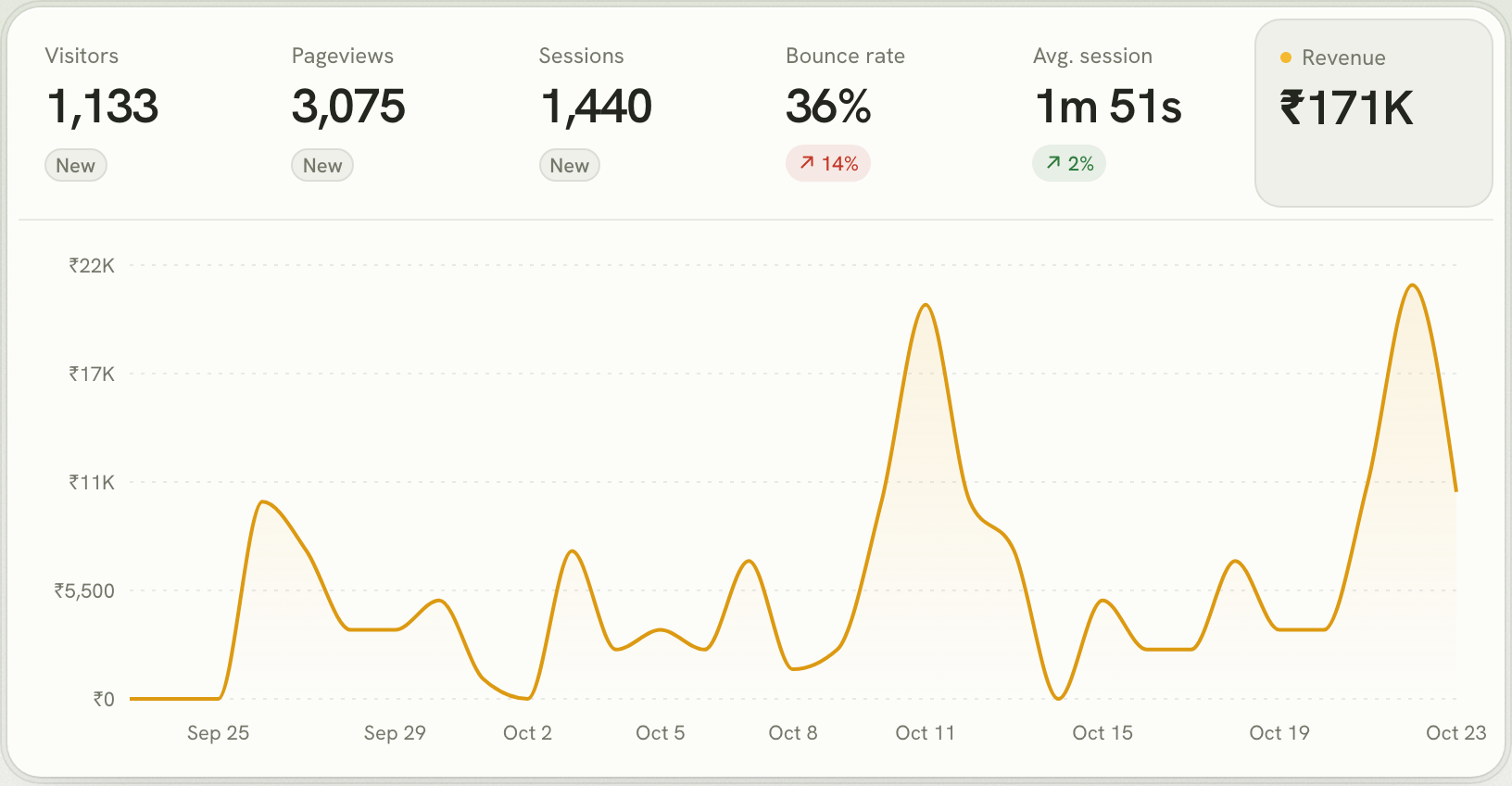
A Revenue figure joins the headline numbers, and the chart can switch from visitors to revenue. Pick any range, from today to the last 90 days, and compare it with the period before. If you're paid only in rupees, revenue is shown in rupees, exactly as paid: a ₹999 plan is ₹999, never a rupee amount converted to dollars and back.
Revenue by channel, the number that decides your marketing
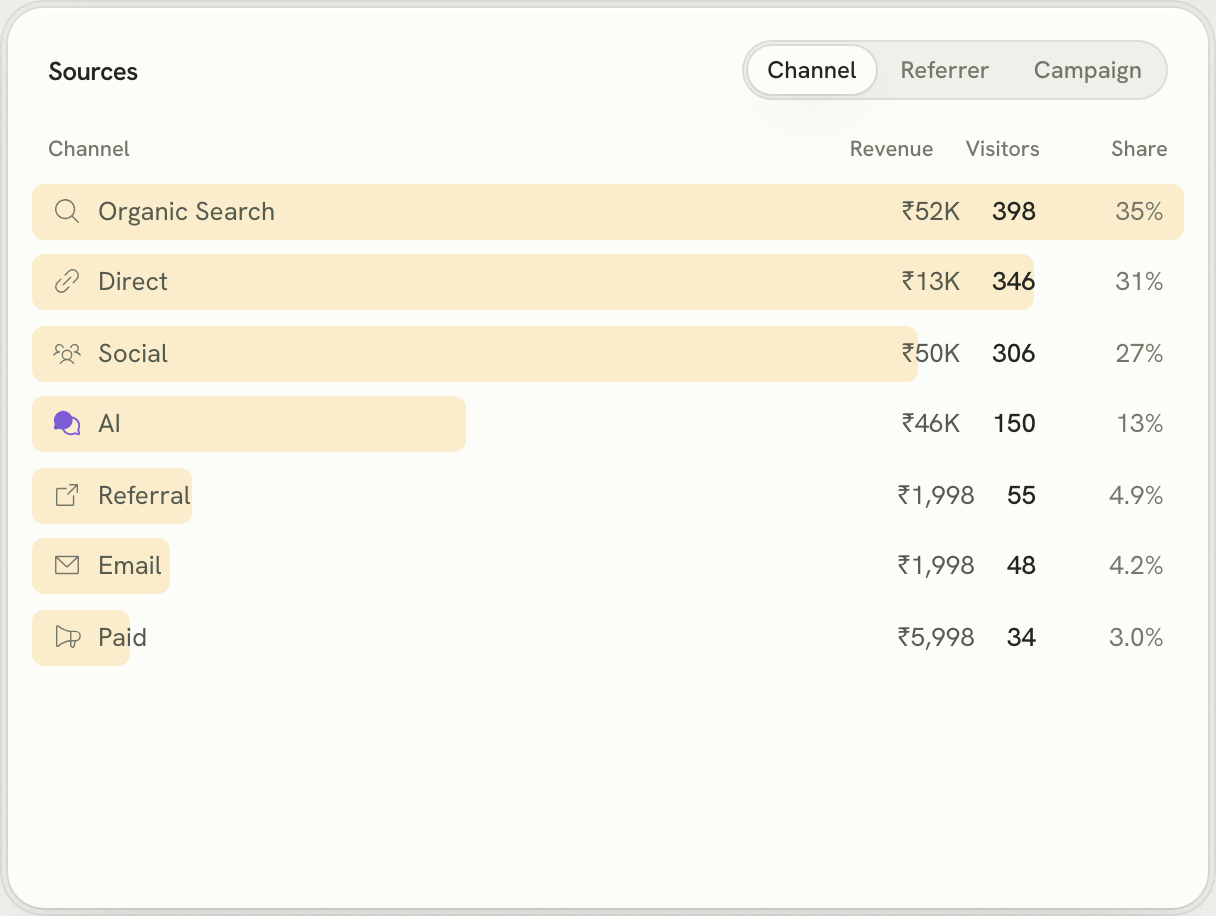
The Sources card adds a Revenue column. Organic Search, Social, AI, Direct, Referral, Email and Paid each show what their visitors went on to pay, and you can switch to the exact referrer (google.com, reddit.com, chatgpt.com, linkedin.com) or to the UTM campaign you tagged your launch with. In the demo below, AI assistants sent 13% of visitors but brought ₹46K, almost as much as Social with twice the traffic. That's the kind of thing you can only see when visits and payments live in one place.
Credit goes to where the customer first came from
People rarely pay on their first visit. Someone reads your Reddit post on Monday, comes back on Thursday by typing your URL, and pays on Saturday. Tools that only look at the last visit would credit "Direct" and you'd conclude Reddit did nothing. Lantern keeps one visitor id across days and subdomains in a first-party cookie on your own domain, and credits the payment to where that visitor first came from: Reddit, in this case. The same goes for the country they were in and the page they first landed on.
Revenue by country, for Indian SaaS that sells abroad
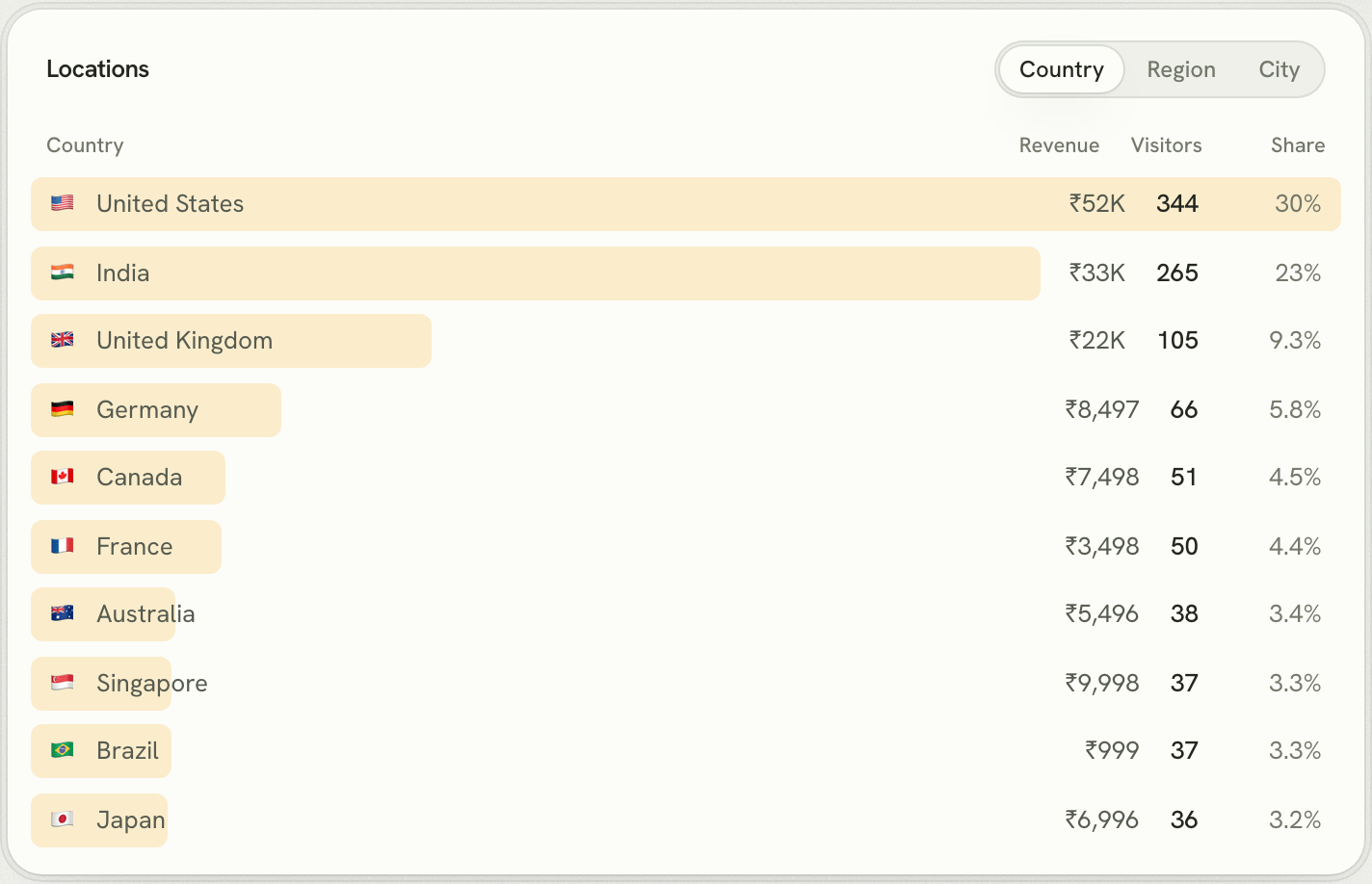
Plenty of Indian founders build in India and sell to the US, the UK and Europe. The Locations card shows revenue next to visitors for every country, region and city, so you can see whether that wave of traffic from Germany is paying or just browsing, and where to put localised pricing.
Renewals and refunds take care of themselves
Tag the first checkout and Lantern does the rest. A Razorpay subscription charge or a renewal arrives with the same customer and subscription as the first payment, so it's credited to the same channel, which means a channel gets credit for the whole lifetime of the customers it brings. Refunds are subtracted from the payment they reverse, so a channel full of refund requests doesn't look better than it is.
How to connect Razorpay
Razorpay API keys can't be limited to read-only, and a key that can issue refunds shouldn't sit in an analytics tool. So Lantern connects to Razorpay with a webhook: Razorpay tells Lantern about each payment as it happens, and nothing Lantern holds can move money.
- Add Lantern to your site if you haven't already. Paste the setup prompt into Claude Code, Codex or Cursor and it installs the script, served from your own domain so ad blockers don't hide visitors.
- Tag the order with the visitor. In the browser, read
window.lantern.visitorId()and send it with your checkout request. On your server, put it in the order'snotes, along with your own user id if the customer is signed in:
const order = await razorpay.orders.create({
  amount: 49900,        // ₹499, in paise
  currency: "INR",
  notes: {
    lantern_visitor_id: visitorId,   // from window.lantern.visitorId()
    lantern_user_id: user?.id ?? "", // the id you pass to identify()
  },
});- Add the webhook. In Lantern, open your site's Settings → Revenue → Razorpay. Copy the webhook URL and the signing secret Lantern generated. In Razorpay, go to Account & Settings → Webhooks → Add new webhook, paste both, and tick
payment.captured,order.paidandrefund.processed. - Optional: import your history. Paste your key id and secret (as
rzp_live_xxx:secret) and Lantern pulls the last 90 days of payments, then checks for new ones every 15 minutes. Lantern only ever reads with it.
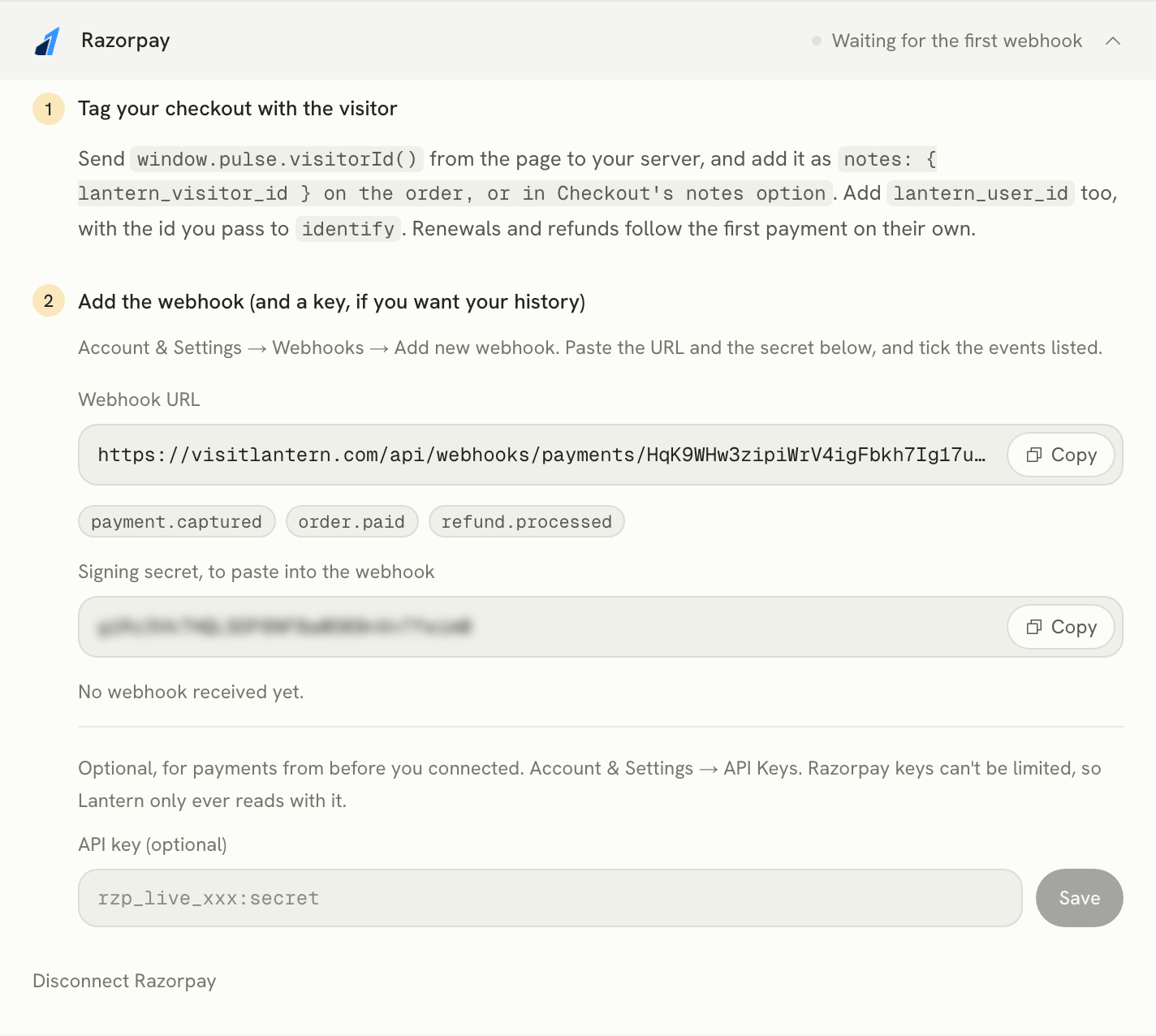
Every payment that clears through Razorpay is counted, whatever the method: UPI, cards, netbanking, wallets, and the recurring charges of Razorpay Subscriptions.
How to connect Cashfree
Cashfree works the same way, through a webhook. The visitor id goes in the order's order_tags:
const order = await cashfree.PGCreateOrder({
  order_amount: 499,
  order_currency: "INR",
  customer_details: {
    customer_id: user.id,
    customer_email: user.email,
    customer_phone: user.phone,
  },
  order_tags: {
    lantern_visitor_id: visitorId,   // from window.lantern.visitorId()
    lantern_user_id: user.id,
  },
});
Then open Settings → Revenue → Cashfree in Lantern, copy the webhook URL, and add it in Cashfree under Developers → Webhooks for the Payment Gateway. Paste your Cashfree secret key into Lantern as well: Cashfree signs its webhooks with that key, so Lantern can check that every payment really came from Cashfree.
One difference from Razorpay: Cashfree has no API for listing past payments, so Lantern starts counting from the moment you connect. Connect it before your next launch, not after.
Not on Razorpay or Cashfree?
Lantern connects to seven payment providers. Where a provider offers a read-only key, Lantern asks for that and imports your last 90 days.
| Provider | How Lantern connects | History on connect | Visitor id goes in |
|---|---|---|---|
| Razorpay | Webhook, plus an optional key for history | 90 days, with a key | Order notes |
| Cashfree | Webhook, signed with your secret key | From when you connect | order_tags |
| Stripe | Read-only restricted key and/or webhook | 90 days | metadata |
| Dodo Payments | Read-only key and/or webhook | 90 days | metadata |
| Paddle | Read-only key and/or webhook | 90 days | customData |
| Polar | Read-only token and/or webhook | 90 days | metadata |
| Lemon Squeezy | Webhook, plus an optional key for history | 90 days, with a key | checkout[custom] |
Many Indian SaaS companies use more than one: Razorpay for Indian customers and Stripe, Paddle or Dodo for everyone else. Connect them all to the same site. Once a site is paid in more than one currency, Lantern shows its revenue in US dollars, converting each payment once, at the rate on the day it was paid, so last month's numbers don't move when the rupee does.
How this compares with other analytics tools
| Lantern | DataFast | Google Analytics 4 | Plausible / Fathom | |
|---|---|---|---|---|
| Razorpay | Connects directly (webhook) | Through its Payment API, from your code | Send purchase events from your code | Send revenue with events from your code |
| Cashfree | Connects directly (webhook) | Through its Payment API, from your code | Send purchase events from your code | Send revenue with events from your code |
| Stripe, Dodo, Paddle, Polar, Lemon Squeezy | All five | Stripe, Dodo, Polar, Lemon Squeezy | Send purchase events from your code | Send revenue with events from your code |
| AI assistants as their own channel | Yes | Yes | No (inside Referral) | No |
| Credit to the first visit, days earlier | Yes, first-party cookie | Yes | Depends on setup | No (no cookie) |
| Starts at | $8/mo | $9/mo | Free | $9/mo / ~$15/mo |
Each vendor's features and prices are as of October 2026; check their sites before deciding. If you're weighing more tools, we compared nine of them in the best web analytics tool for founders.
What Lantern can and can't do with your payment account
- Webhooks can't move money. They only tell Lantern that a payment or refund happened. That's why it's the default for Razorpay and Cashfree.
- Keys are optional, and used only to read. Where a provider has read-only keys (Stripe, Dodo, Paddle, Polar), Lantern asks for exactly that. Where it doesn't (Razorpay, Lemon Squeezy), a key is optional and Lantern only sends it read requests.
- Keys and secrets are encrypted before they're stored, and every webhook's signature is checked, so nobody can post fake payments into your stats.
- Customers' emails aren't stored. Lantern keeps only a one-way hash of each email, used to match a payment to a signed-in visitor.
The ten-minute setup
- Start a free trial and add your website. No card needed.
- Paste Lantern's setup prompt into your coding agent. It installs the script and tags your checkout with the visitor id.
- Open Settings → Revenue, pick Razorpay or Cashfree, and add the webhook.
- Make a test purchase and watch it appear, credited to the channel you came from.
Questions Indian founders ask
Does it work with UPI payments?
Yes. Lantern reads captured payments from Razorpay or Cashfree, whatever the payment method, so UPI, UPI Autopay, cards, netbanking and wallets are all counted.
What about Razorpay Payment Links and Payment Pages?
They're counted as revenue, but they don't carry your visitor id, so Lantern can only link them to a visit when the customer is someone it already knows through identify. For attribution, create orders from your own checkout and tag them as shown above.
What if I'm paid in rupees and dollars?
Paid only in rupees, you see rupees, exactly as paid. Once payments arrive in more than one currency, say INR from Razorpay and USD from Stripe, Lantern adds them up in US dollars, converting each payment at the rate on the day it was paid. Either way, a figure never changes after the fact.
Do I need a developer?
Only for the line that adds the visitor id to your order, and a coding agent writes that for you from Lantern's setup prompt. The webhook is copy and paste.
What happens to revenue from visitors who block analytics?
Lantern is served from your own domain, so most ad blockers don't stop it. If a payment still can't be linked to a visit, it's counted in your revenue total and shown as "not linked", never dropped.