GA4 wasn't built for founders. Here's the alternative that was (2026 guide)
Why Google Analytics 4 frustrates startup founders, what to use instead, and how to switch in ten minutes. A complete guide to Lantern, the GA4 alternative built around one question: where do my customers come from?
· 16 min read
If you're a founder and Google Analytics 4 feels like a maze, switch to Lantern. It's web analytics built around the one question a founder asks every day, "where did this customer come from?", and it answers it on a single screen: every channel including ChatGPT and other AI assistants, the AI crawlers reading your site, a live view of who's on it, and goals and funnels your coding agent sets up for you. It installs in about a minute and starts at $8 a month, after a 7-day free trial with no card.
This guide is long because the switch deserves a straight answer. It covers exactly where GA4 lets founders down, how Lantern fixes each of those problems, what you'd give up by leaving GA4 (there are a few things), and a ten-minute plan for moving over without losing a day of data. If you'd rather see it than read about it, open the live demo; it's the real product running on a real-looking site.

Why GA4 frustrates founders
GA4 is not a bad product. It's an enormous one, designed for marketing teams with an analyst, a tag manager and a Google Ads budget. Point it at a two-person startup and the same power turns into friction. These are the six complaints we hear most from founders, and they're the reason Lantern exists.
1. The answer you need is five clicks deep
You want to know where last week's sign-ups came from. In GA4 that means finding the right report under Acquisition, changing the primary dimension, adding a key event as a column, and hoping the date range and comparison are what you think they are. For anything more specific you build an Exploration. None of it is hard once you know it. All of it is time a founder doesn't have, every single week.
2. AI assistants disappear into "Referral"
In 2026 a growing share of buyers ask ChatGPT, Perplexity, Gemini or Claude which tool to use before they ever search Google. GA4's default channel grouping has no AI channel, so those visits land in Referral next to every blog that ever linked to you, or in Direct when the assistant strips the referrer. Your fastest-growing channel ends up invisible unless you write a custom channel group with a regex. (Here's how to do that in GA4, if you're staying.)
3. It can't see the AI crawlers deciding whether to recommend you
Before an assistant recommends your product, its crawler has to read your pages. GPTBot, ClaudeBot, PerplexityBot and the rest never run JavaScript, so a JavaScript tag like GA4's never sees them at all. You have no idea whether AI is reading your site, which pages it reads, or whether it fetched your pricing page to answer someone's question five minutes ago.
4. Developers block it
If you sell to developers, designers or other founders, a big slice of your audience browses with Brave, Arc, uBlock Origin or a privacy extension. GA4 is the first script all of them block, because it loads from Google's domain and every blocklist knows it. On a technical audience that can hide a fifth or more of your visitors, and those are often the most valuable ones.
5. Today's numbers aren't ready until tomorrow
GA4's standard reports can take a day or two to settle. The Realtime report only covers the last 30 minutes and only a few dimensions. On launch day, when you post to Hacker News and want to watch what happens, that gap is exactly when you need the data.
6. The data quietly gets thinner
Event-level data in Explorations is kept for two months by default and fourteen at most on the free plan. Low-volume reports get thresholded or rolled into an "(other)" row. Large Explorations get sampled. Each of these is reasonable at Google's scale. For a startup with a few thousand visitors, it means the small numbers you care about most are the ones GA4 is least willing to show you.
Add the setup itself (key events, a tag manager container, filters for your own traffic, linking Search Console) and most founders end up with a GA4 property they rarely open. That's the real cost: not the price, but that the data never turns into a decision.
Lantern: the GA4 alternative built for founders
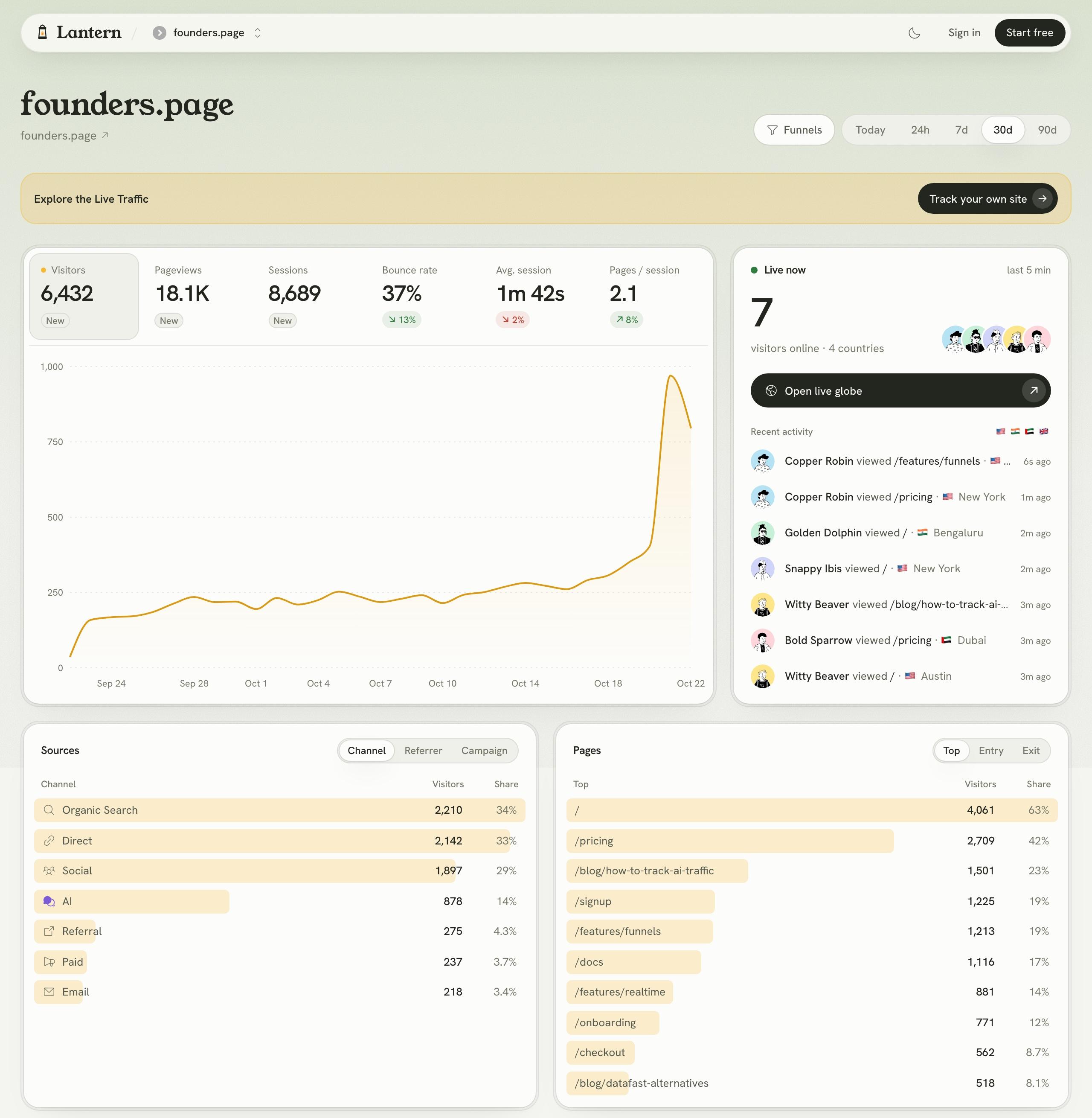
Lantern started from the opposite end. Instead of a reporting engine you configure into answers, it's the answers, already laid out. One dashboard shows your visitors, where they came from, what they read, where they are, whether they converted, and who's on the site right now. There's nothing to build. Here's how it handles each of the six problems above.
The answer is on the first screen
Pick a date range and everything updates together: the headline numbers with their change against the previous period, the traffic chart, sources, pages, countries, devices, goals and AI crawlers. Click any row, say reddit.com or /pricing, and the whole dashboard filters to it. That's the entire interface. Founders who've given up on GA4 tell us they open Lantern every morning, which is the point: analytics you actually look at beats analytics that can do anything.
AI is a channel of its own
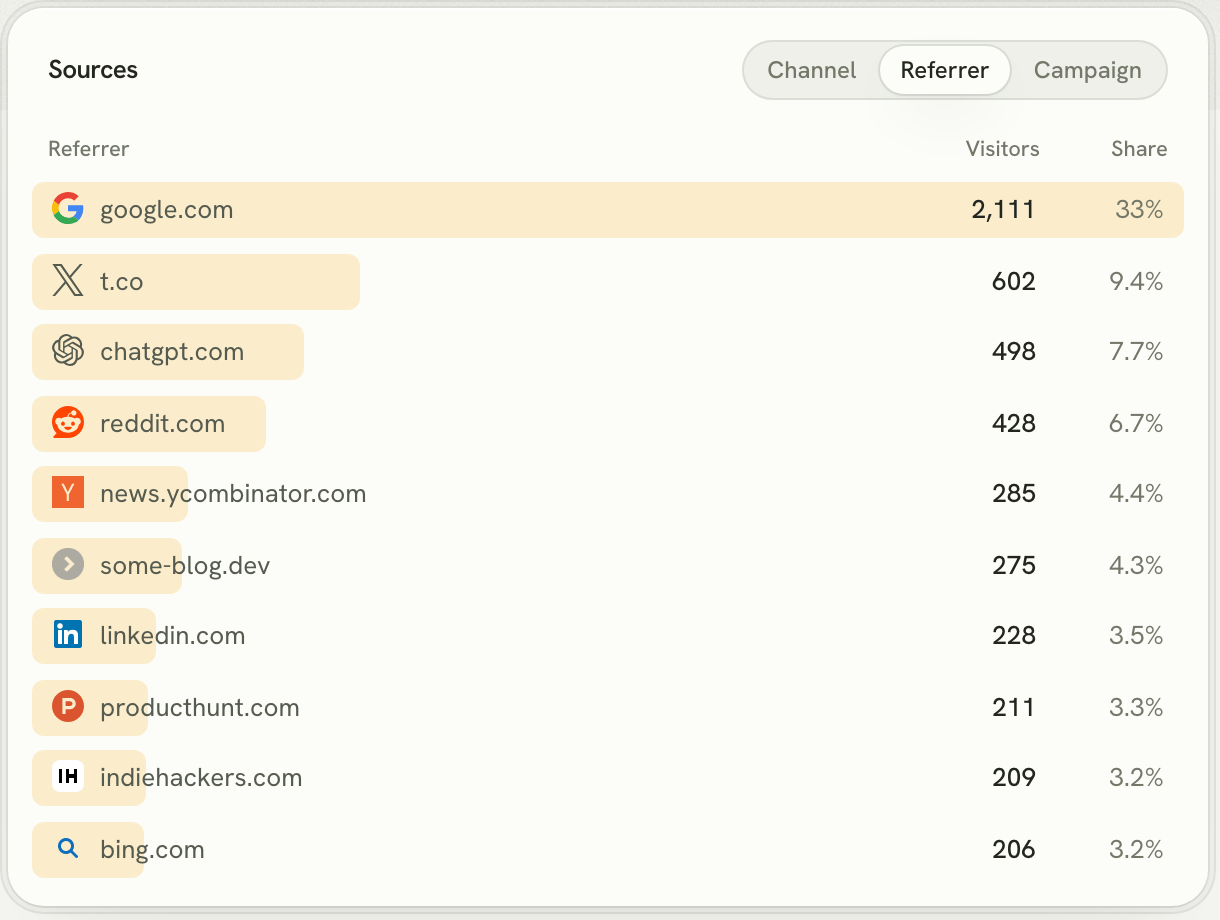
Lantern sorts every visit into Organic Search, Social, Direct, AI, Referral, Paid and Email automatically. ChatGPT, Perplexity, Gemini, Claude, Copilot and the other assistants land in AI, right next to Google, from the first visit and with no regex. Switch to Referrer to see the exact sites, each with its icon, or Campaign to see your UTM-tagged links.
AI crawlers, by the company that runs them
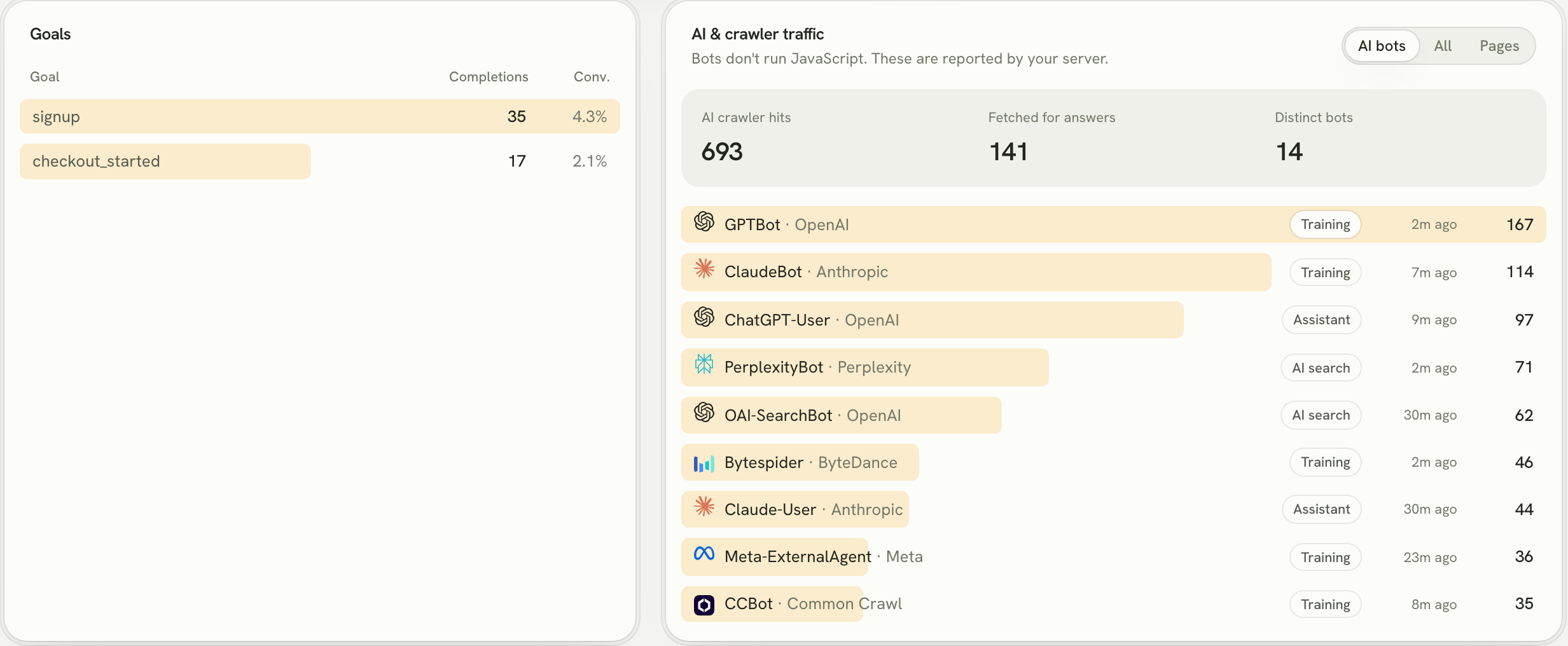
Lantern adds a few lines on your server (your coding agent does it during setup) and reports every bot that reads your site, grouped by operator and by what it was doing: training crawlers like GPTBot, AI search indexers like OAI-SearchBot and PerplexityBot, and live fetches like ChatGPT-User, made because a person asked an assistant a question that your page might answer. It's the closest thing there is to a ranking report for AI search, and GA4 can't produce it.
First-party, so ad blockers don't erase your audience
Lantern's script is served from your own domain through a single rewrite that's part of the normal install, so a blocklist sees your site, not an analytics vendor. Its visitor ID lives in a first-party cookie on your domain, never a third-party one, so Brave and Arc don't strip it. The developer who arrives from a Hacker News thread with every shield up is counted, and recognised when they come back on Friday to sign up.
One visitor, across days and subdomains
That same ID follows a visitor from www to app and from Monday to Friday. When someone reads your landing page, leaves, and returns days later to create an account, the sign-up is credited to the channel that first brought them, not to "Direct". That's the difference between knowing your Reddit posts work and guessing.
Live means live
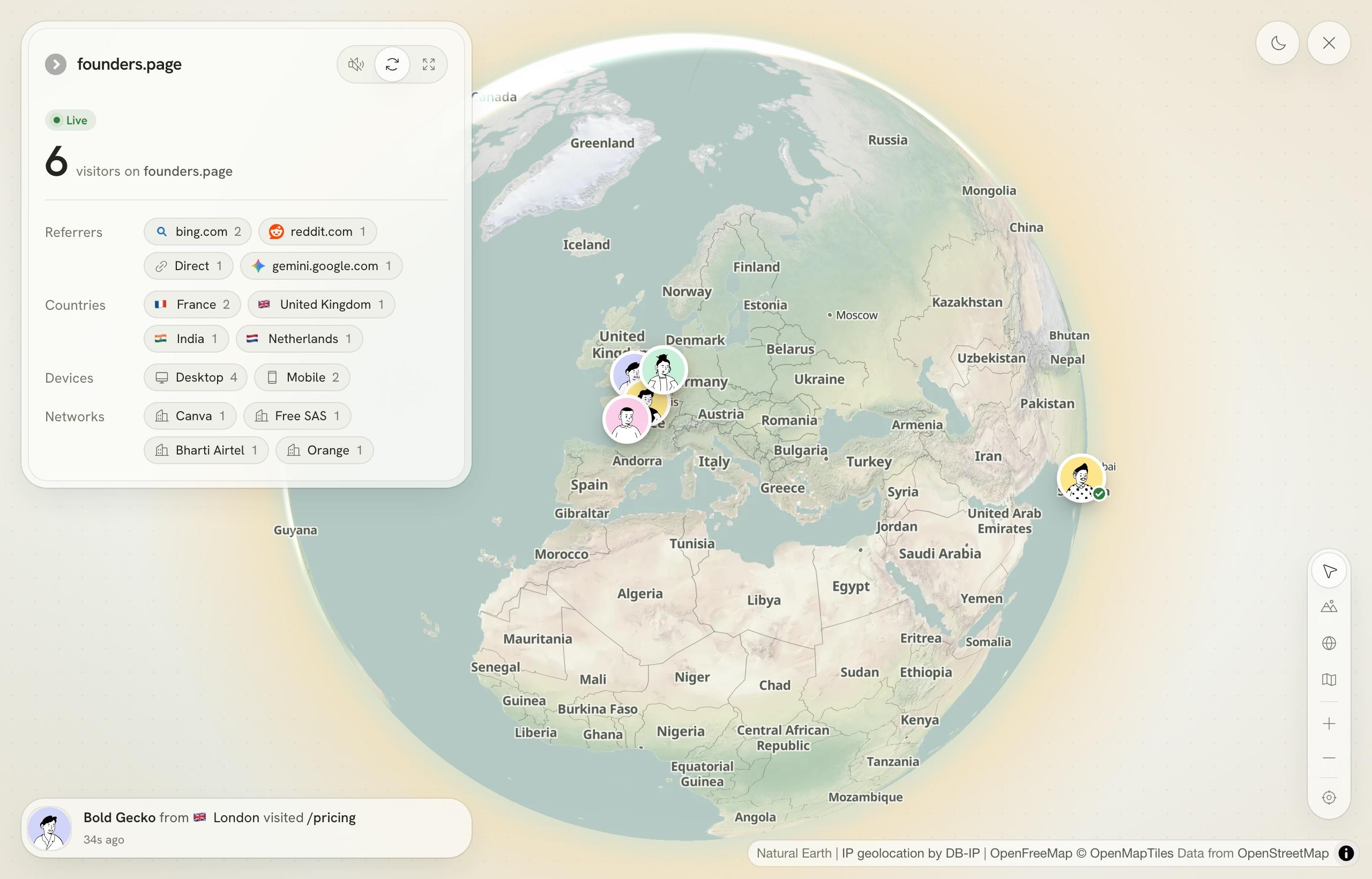
Lantern updates as visits happen. The Live now panel on the dashboard shows who's on the site and what they just did, and the live globe puts every current visitor on a map with their page, source, country and device. When a sign-up happens you see it. It's the tab founders leave open on launch day.
Every visit counted, and kept
Lantern doesn't threshold, sample or bucket your small numbers into "(other)". The three visitors who came from a newsletter mention show up as three. And the history stays: Starter keeps 3 years of data and Growth keeps 5 or more, so you can compare this launch with last year's.
Goals and funnels without a tag manager
In GA4, conversions mean defining events, marking them as key events and often wiring them through Google Tag Manager. In Lantern you paste one setup prompt into Claude Code, Codex or Cursor. Your coding agent installs the script, reads your code to find the sign-up, checkout and activation points, and adds those goals for you. If you'd rather do it by hand, a goal is one attribute on a button:
<button data-pulse-goal="signup">Create account</button>
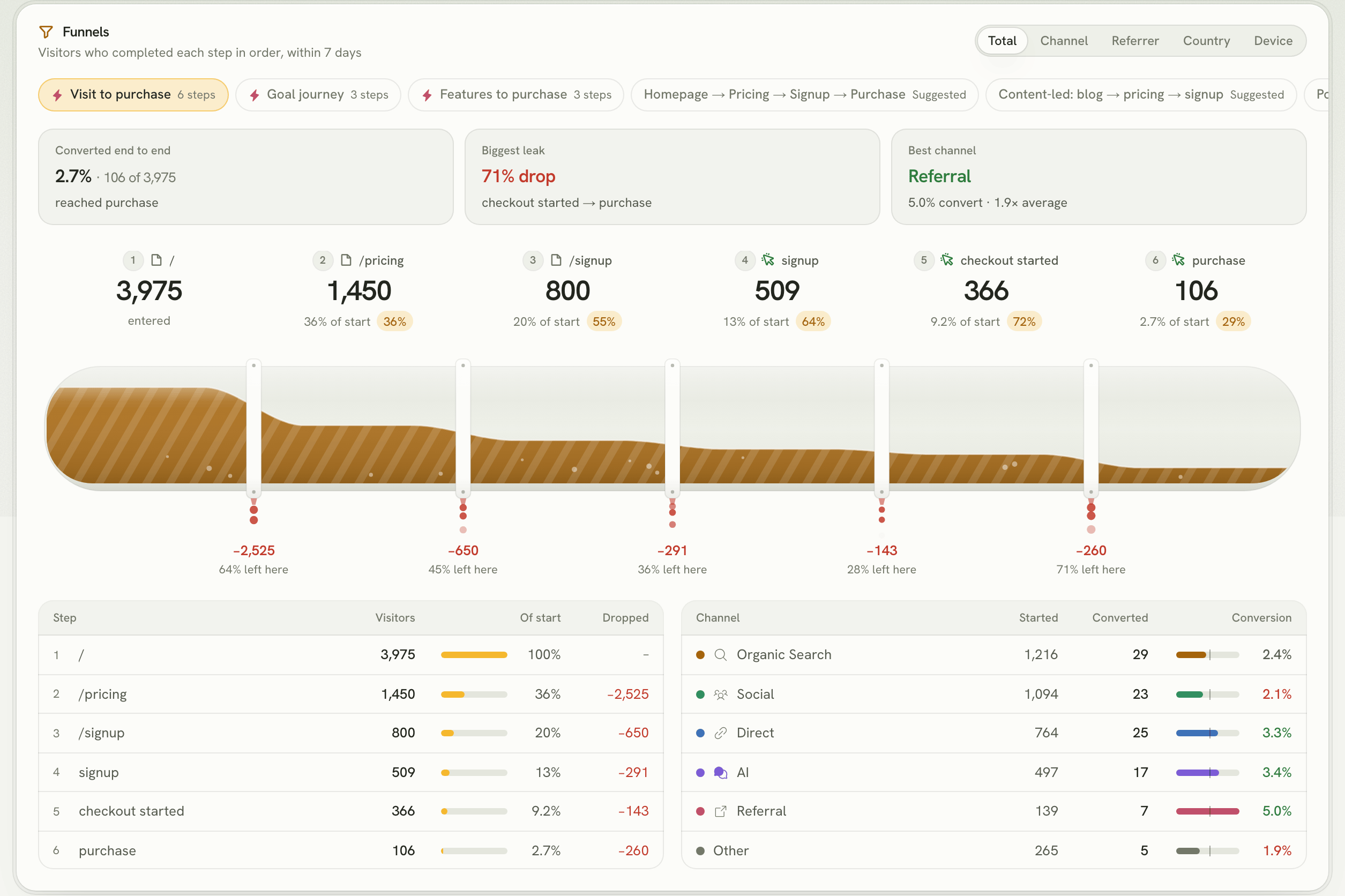
Funnels work the same way. Lantern looks at the paths your visitors already take and suggests funnels from them; each one runs on the last 90 days the moment you save it, with the drop-off at every step, the biggest leak, and which channel converts best.
GA4 vs Lantern, side by side
| Google Analytics 4 | Lantern | |
|---|---|---|
| Built for | Marketing teams and Google Ads advertisers | Founders who want to know which channel brings customers |
| Time to useful answers | Hours to days of setup and learning | About a minute, set up by your coding agent |
| AI assistants (ChatGPT, Perplexity…) | Inside Referral or Direct unless you build a custom channel group | Their own AI channel, automatically |
| AI crawlers (GPTBot, ClaudeBot…) | Not visible | Every bot, by operator and purpose |
| Ad blockers and Brave | Blocked by default | Served from your own domain |
| Cookie | Google's, set on your domain | First-party, on your domain |
| Same visitor across days and subdomains | Yes, with cross-domain setup | Yes, by default |
| Real-time | Last 30 minutes, limited dimensions | Live dashboard and live globe |
| Small numbers | Thresholding, sampling and "(other)" rows | Every visit shown |
| Data kept | 2 months by default, 14 at most (event data) | 3 years on Starter, 5+ on Growth |
| Goals and funnels | Key events, often via Tag Manager; funnels in Explorations | Added by your coding agent; funnels suggested for you |
| Price | Free | From $8/mo after a 7-day free trial |
What you give up by leaving GA4
Switching is the right call for most founders, but not for everyone, and it's better to know before you move. GA4 is still the stronger choice if:
- You spend serious money on Google Ads and rely on GA4 audiences and conversion imports to steer bidding. That integration is GA4's home turf.
- You need BigQuery export to join raw web events with the rest of your warehouse.
- The budget is truly zero. GA4 costs nothing in money. It costs time instead, and for most founders time is the scarcer of the two.
If one of those applies, you don't have to choose. Lantern's script runs happily next to GA4's. Plenty of founders keep GA4 for ads and use Lantern for everything they actually look at.
How to switch from GA4 to Lantern in ten minutes
- Start a free trial. Sign up and add your website. No card, and you get the full product for 7 days.
- Paste the setup prompt into your coding agent. Claude Code, Codex or Cursor installs the script, serves it from your own domain, adds the server lines for AI crawler tracking, and instruments your sign-up and checkout goals.
- Deploy, then visit your own site. You'll see yourself appear in Live now within seconds. That's your confirmation it works.
- Run both for a couple of weeks. Leave GA4 in place while Lantern builds up history. You'll notice Lantern counts more visitors, mostly the ones GA4's script was blocked for.
- Export what you want to keep from GA4, then remove its tag when you're ready. One less script also makes your pages a little faster.
- Tag your links. Add UTM parameters to the links you share in newsletters, launches and ads so Lantern can name each campaign (a quick guide).

What a week with Lantern looks like
On Monday morning a short email tells you how last week went for each of your sites: visitors, visits from AI, top sources and goals. If something moved, you open the dashboard and click the row that moved. That's usually the whole session.
On launch day you post the link and keep the live globe open. You watch Hacker News visitors arrive, see which page they land on, and catch the first sign-up as it happens. By the evening you know which post worked, and the next morning you know whether those visitors came back.
Once a month you check the AI crawler card. If ChatGPT-User fetches are climbing on your pricing page, assistants are recommending you, and you'll see the AI channel follow. If GPTBot has never visited, you know where your next piece of work is. None of this needs a report builder. It's just there.
What it costs, compared with "free"
Lantern starts at $8 a month for 10,000 pageviews on one website. Growth covers up to 30 websites from $17 a month. Pricing goes up only with traffic, every feature is on every plan, and yearly billing gives you two months free. Every account starts with a 7-day free trial, no card needed.
GA4 is free, but count the hours: learning the interface, setting up key events, building the Explorations you need, and re-checking numbers you don't quite trust. If that's even one hour a month, Lantern is the cheaper of the two.
What about other GA4 alternatives?
There are good tools that do one part of this well. Plausible and Fathom give you simple, private visit counts but use no cookie, so they can't connect a returning visitor's sign-up to the channel that first found them. PostHog is excellent for product analytics inside your app but is a lot of tool for "where did my customers come from". Umami and Matomo suit teams that must self-host. We compared nine of them, with prices, in the best web analytics tool for founders, and the shorter list in the best GA4 alternatives. For a founder who wants acquisition answers, AI included, Lantern is the one built for exactly that.
Questions founders ask before switching
Will I lose my historical GA4 data?
No. Your GA4 property keeps its data after you remove the tag, within GA4's own retention limits. Lantern starts counting from the day you install it, which is why running both for a few weeks is the smoothest switch.
Why does Lantern show more visitors than GA4?
Mostly because Lantern is served from your own domain and GA4 isn't, so visitors with ad blockers or Brave shields are counted in Lantern and missing from GA4. It also doesn't threshold or sample small numbers.
Does Lantern work with Next.js, Astro, WordPress or Webflow?
Yes. It's one tag in your <head>, so it works with any framework or site builder. With a coding agent the setup prompt handles the details for your stack.
Can Lantern track ChatGPT traffic?
Yes, automatically. ChatGPT, Perplexity, Gemini, Claude and other assistants are grouped into their own AI channel, and you can drill into each one by referrer.
Is Lantern privacy-friendly?
Lantern uses a first-party cookie on your own domain, never a third-party one, and never sells your data. The privacy policy spells out the rest.
Can I try it without installing anything?
Yes. The live demo is the full product on a demo site, updating in real time. No sign-up needed.