Why is GPTBot traffic not showing up in GA4? (And how to actually see it)
GPTBot never runs JavaScript, and GA4 only counts visits that do, so OpenAI's crawler is invisible in a standard GA4 setup. Here's why, how to check your server logs, and how Lantern shows every AI crawler by page in a minute.
· 13 min read
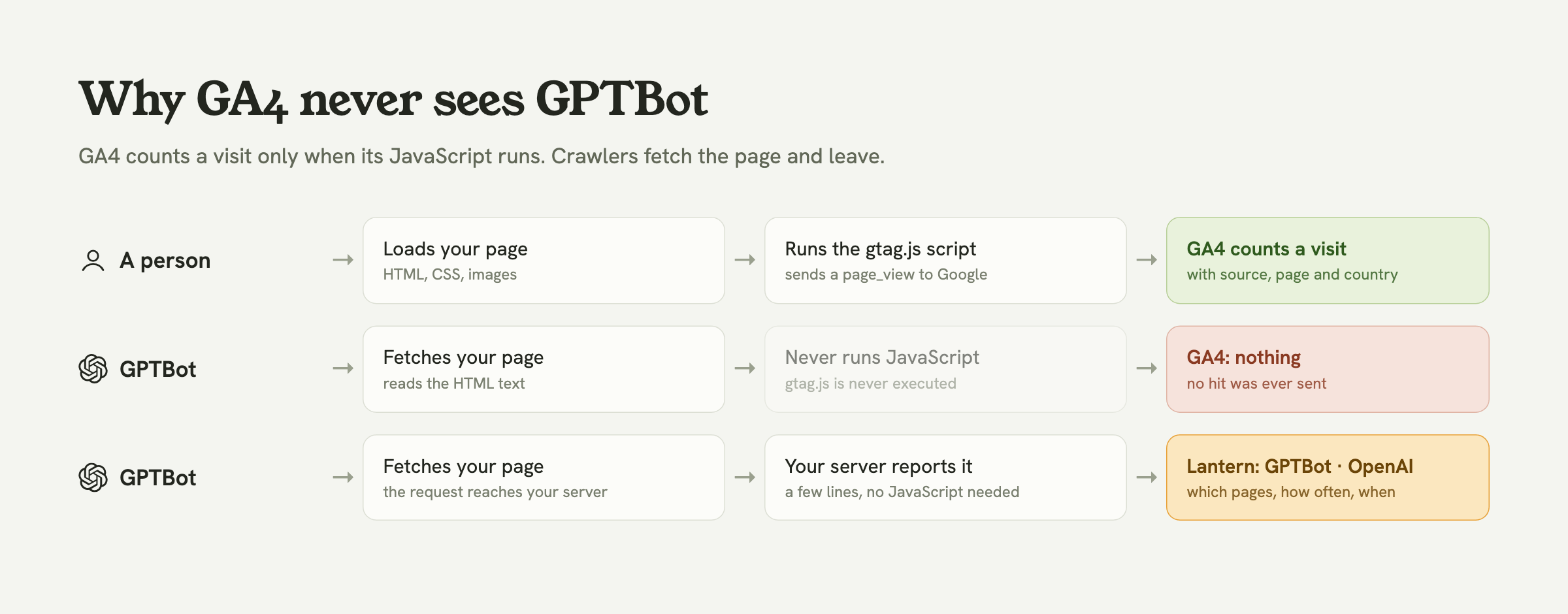
GPTBot doesn't show up in Google Analytics 4 because it never runs JavaScript, and GA4 only records a visit when its JavaScript runs. OpenAI's crawler downloads your page's HTML, reads the text and leaves. The GA4 tag (gtag.js or Google Tag Manager) is never executed, so no hit is ever sent to Google. On top of that, GA4 automatically drops traffic from known bots, and you can't switch that off. Your setup isn't broken. GA4 simply can't see crawlers.
To see GPTBot, you have to look where it actually shows up: at your server. This guide explains exactly what's happening, how to check your logs by hand, and how Lantern puts GPTBot, ClaudeBot, PerplexityBot and around 35 other crawlers on the same dashboard as your human visitors, page by page, with a few lines of server code. You can see it live in the demo right now.

Why GA4 can't see GPTBot
Three separate things keep OpenAI's crawler out of your GA4 reports. Any one of them would be enough.
1. GA4 is a JavaScript tag, and crawlers don't run JavaScript
A GA4 "visit" is not a request to your server. It's a small request the visitor's browser sends to Google after it has loaded your page and run the GA4 script. A person in Chrome does that automatically. GPTBot doesn't: it fetches the HTML and moves on. Independent analyses of AI crawler traffic, such as Vercel's study with MERJ, found that OpenAI's and Anthropic's crawlers download JavaScript files without executing them. No script, no hit.
2. GA4 filters known bots, and you can't turn that off
Even a crawler that did run JavaScript would usually be filtered out. GA4 automatically excludes traffic from known bots and spiders, and unlike Universal Analytics, there's no setting to disable it. GA4 is designed to measure people, so bots are removed on purpose.
3. "GPTBot" is only one of OpenAI's agents
OpenAI documents three different user agents, and they do very different jobs:
| User agent | What it does | Shows in GA4? |
|---|---|---|
| GPTBot | Crawls the web for training OpenAI's models | No |
| OAI-SearchBot | Indexes pages so they can appear in ChatGPT search results | No |
| ChatGPT-User | Fetches a page live because someone asked ChatGPT about it | No |
| A person clicking a link in ChatGPT | A human visit, from chatgpt.com | Yes, usually as a referral |
The first three are the crawlers this guide is about. The last row is different: that's a real person in a real browser, so GA4 does count it, usually as chatgpt.com / referral. That's the only part of ChatGPT's activity on your site you'll find in GA4, and it's mixed in with every other referral.
Why you should care what GPTBot reads
If GPTBot can't see your page, ChatGPT can't learn about it, and if OAI-SearchBot hasn't indexed it, ChatGPT search can't cite it. In 2026 a growing share of buyers ask an assistant before they ask Google, so the crawlers are an early signal of whether you're in the running at all:
- Is GPTBot reaching your important pages, or only your homepage and robots.txt?
- Did a robots.txt rule or a firewall block it without you noticing?
- Is ChatGPT-User fetching your pricing page? Those fetches happen because a person asked ChatGPT a question your page might answer. It's the closest thing to a ranking report for AI search.
- After you publish something new, how long until the AI crawlers find it?
None of that is visible in GA4. All of it is visible from your server.
How to check for GPTBot yourself
Before reaching for any tool, you can confirm GPTBot is visiting with what you already have.
Your server or hosting logs
Every request a crawler makes is in your web server's access log, with its user agent. On a server running nginx or Apache, this counts which pages OpenAI's agents asked for:
grep -E "GPTBot|OAI-SearchBot|ChatGPT-User" /var/log/nginx/access.log \
  | awk '{print $7}' | sort | uniq -c | sort -rn | head -20
On Vercel, Netlify or another managed host, the same information is in the platform's request logs, though most keep only a few days of it. If your site sits behind Cloudflare, its AI Crawl Control dashboard shows which AI crawlers are hitting your zone.
Make sure it's really GPTBot
Anyone can put "GPTBot" in a user agent. OpenAI publishes the IP ranges its crawlers use, so if accuracy matters (for example, before deciding whether to block it), check the request's IP against that list.
Check you aren't blocking it
If you find nothing at all, look at your robots.txt for a User-agent: GPTBot block with Disallow: /, and at your firewall or CDN bot rules. Many sites started blocking AI crawlers by default in 2024 and 2025, sometimes without the owner knowing.
Why this gets old fast
Logs answer "did GPTBot visit today?" but not the questions you'll ask every week: which pages it reads, whether that's rising, whether ChatGPT-User started fetching your pricing page, and whether any of that turned into visitors. Answering those from raw logs means keeping logs, writing scripts and remembering to run them.
Can you force GPTBot into GA4?
Technically, yes: your server could detect crawler requests and send them to GA4 with the Measurement Protocol. In practice it's a poor fit:
- You'd mix bot hits into a property built to count people, so every report needs a filter to take them back out.
- GA4 doesn't know which company runs which crawler, or what GPTBot, OAI-SearchBot and ChatGPT-User each mean.
- You'd be writing and maintaining the detection, the sending and the custom reports yourself.
A tool that already understands crawlers is less work than teaching GA4 about them.
How Lantern shows GPTBot (and every other AI crawler)
Lantern is web analytics for founders. Its tracking script counts people, like GA4 does, and a few lines on your server report crawlers, which GA4 can't. Both land on the same dashboard.
Every AI crawler, by the company that runs it
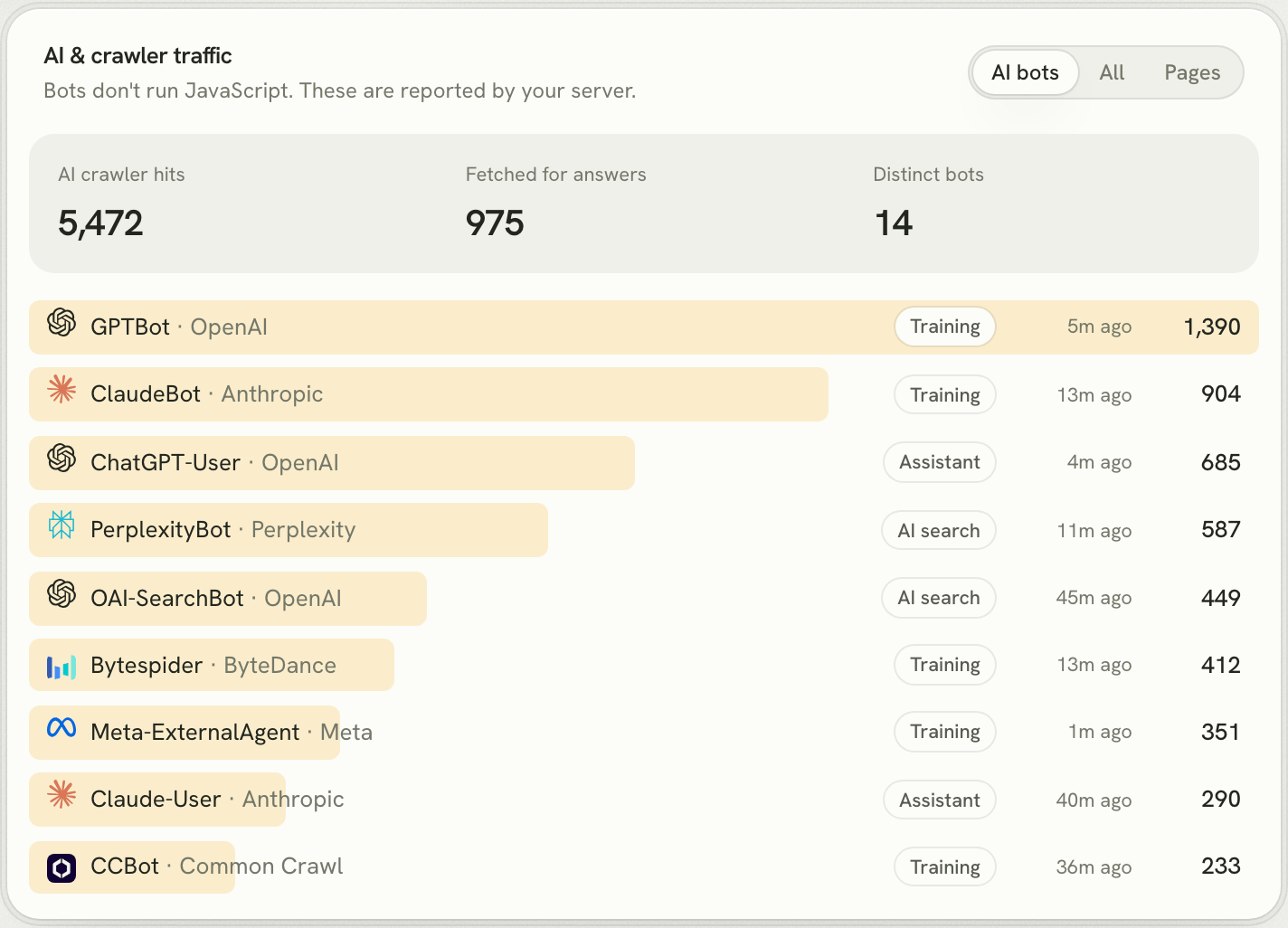
The AI & crawler traffic card lists each bot with its operator and what it was doing: Training (GPTBot, ClaudeBot, CCBot), AI search (OAI-SearchBot, PerplexityBot) and Assistant (ChatGPT-User, Claude-User, fetching a page because someone asked). "Fetched for answers" counts the assistant fetches, the ones that mean a real person is asking about you right now.
Which pages they read
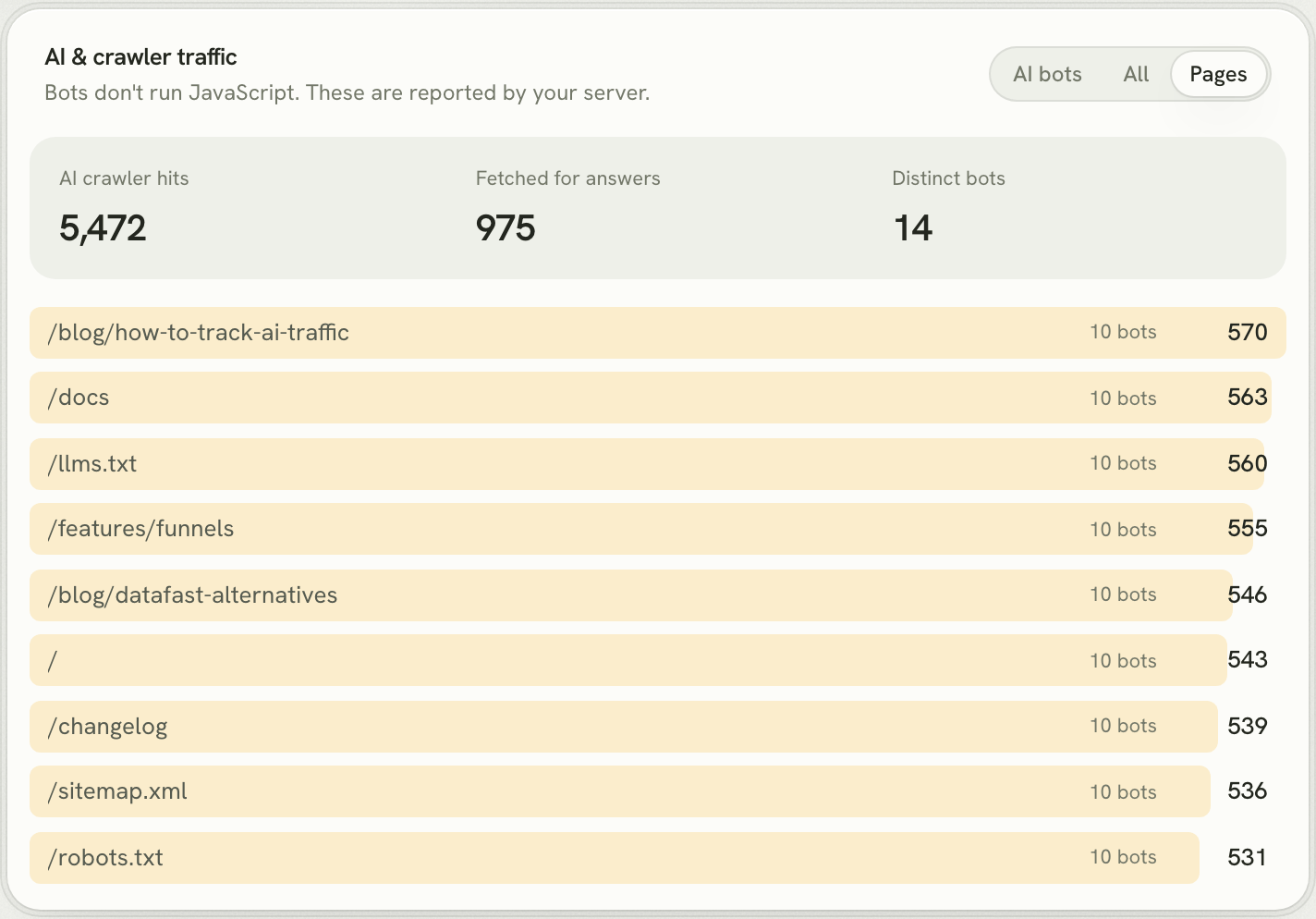
Switch to Pages to see what AI crawlers actually read, and how many different bots read each page. If your pricing or product pages are missing from this list, assistants know less about you than you think.
AI crawlers next to Googlebot
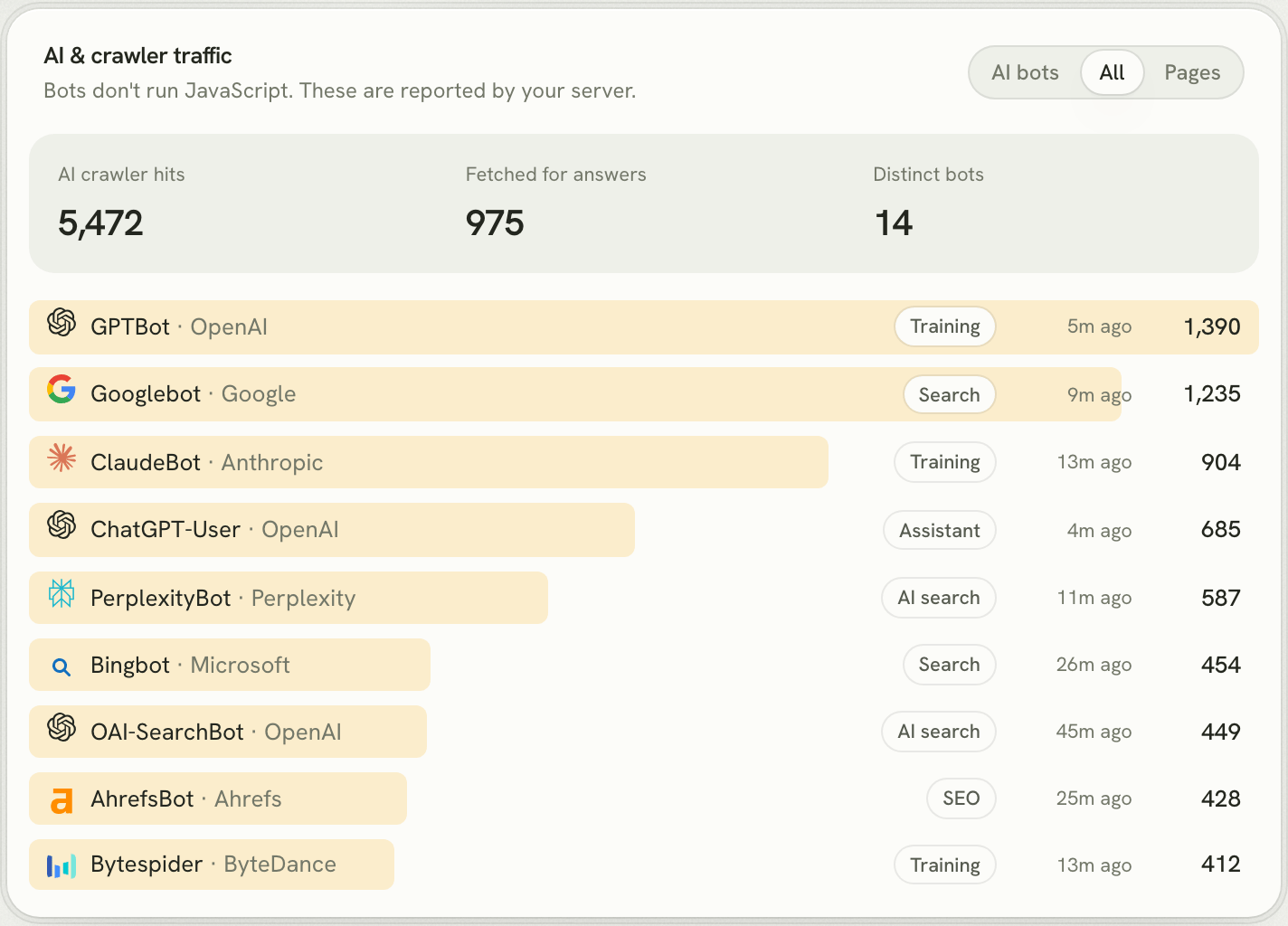
The All tab adds search engines and SEO tools, so you can compare GPTBot with Googlebot and Bingbot directly. On many sites today, OpenAI's crawler is already one of the busiest visitors.
And the people ChatGPT sends you
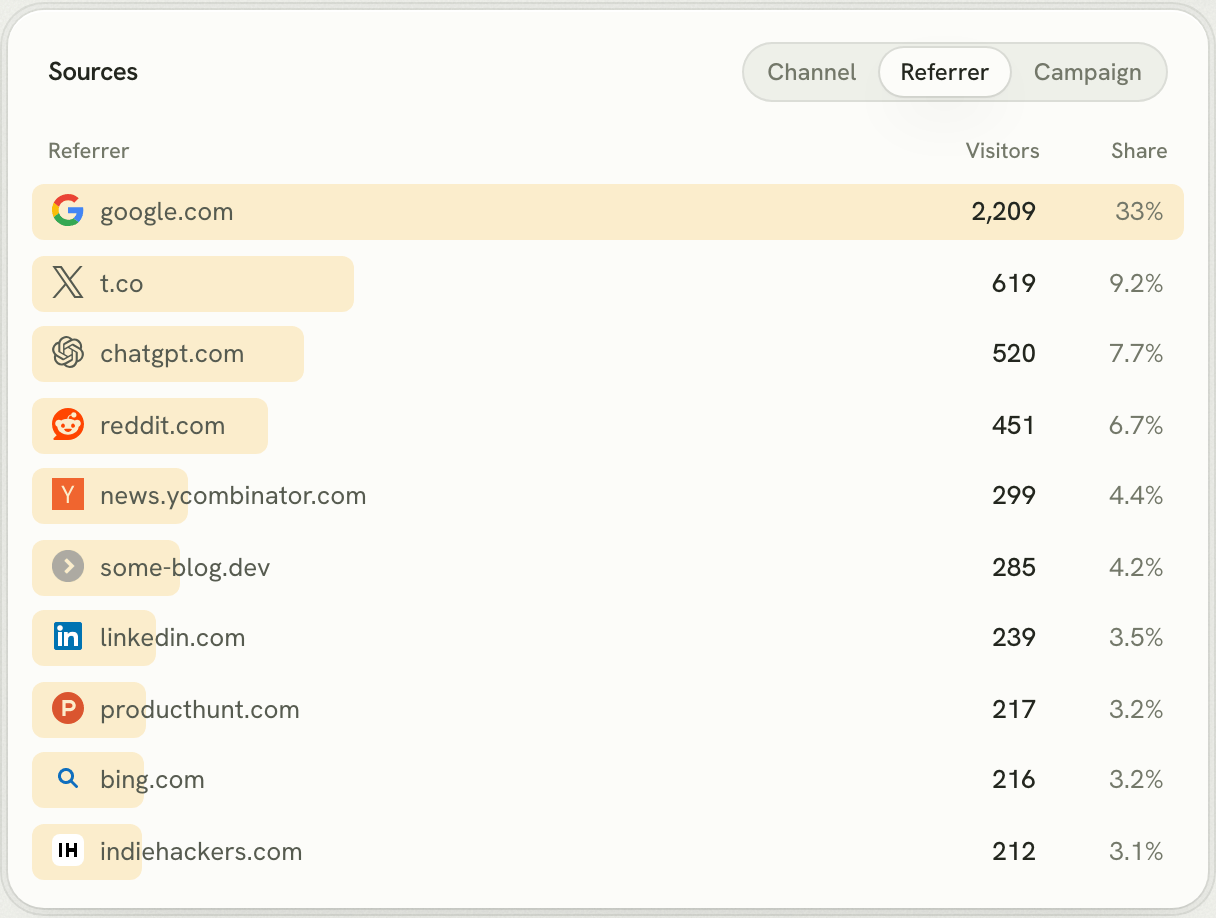
Crawling is half the story. The other half is the visitors who arrive after an assistant recommends you. Lantern puts ChatGPT, Perplexity, Claude, Gemini and Copilot in their own AI channel, separate from Referral, and shows each one by referrer. Crawler reads at the top of the funnel, AI visitors in the middle, and, if you connect your payment provider, the revenue they bring at the bottom.
Set it up in a few minutes
- Add Lantern to your site. Sign up, add your domain, and paste the setup prompt into Claude Code, Codex or Cursor. Your coding agent installs the script and sets up your goals.
- Report crawlers from your server. Your site's Install panel has a ready-made Next.js snippet for
proxy.ts(ormiddleware.ts) with your bot secret filled in. On any other server, send crawler requests to Lantern's bot endpoint. Here's the idea in Express:
const BOT = /bot|crawl|spider|GPTBot|ChatGPT|Claude|Perplexity|Bytespider|CCBot|meta-external/i;

app.use((req, res, next) => {
  const ua = req.get("user-agent") ?? "";
  if (BOT.test(ua)) {
    // Fire and forget: never slow the page down for a crawler report.
    fetch("https://api.visitlantern.com/api/bot", {
      method: "POST",
      headers: { Authorization: `Bearer ${process.env.LANTERN_BOT_SECRET}`, "Content-Type": "application/json" },
      body: JSON.stringify({ ua, url: `https://${req.hostname}${req.originalUrl}`, ip: req.ip }),
    }).catch(() => {});
  }
  next();
});- Open the AI & crawler traffic card. Each crawler appears the next time it visits. How soon that is depends on how often it crawls your site.
Lantern recognises about 35 crawlers and ignores human user agents, so it's safe to send more than you need. Your site's bot secret and a ready-made snippet are in its Install panel; the docs cover the details.
Questions people ask
Is GPTBot traffic counted as users or sessions anywhere in GA4?
No. With a standard GA4 tag, GPTBot never runs the tag, so it never creates a user, session or event.
I see chatgpt.com in GA4. Isn't that GPTBot?
No. That's a person who clicked a link in ChatGPT and arrived in their own browser. It's valuable traffic, but it tells you nothing about which pages GPTBot crawled.
Should I block GPTBot?
It depends on whether you want your content used to train OpenAI's models. Blocking GPTBot doesn't block OAI-SearchBot or ChatGPT-User, which are what let ChatGPT search and answers show your pages. Whatever you decide, measure first: you can't make a good call about a crawler you can't see.
Does Google Search Console show GPTBot?
No. Search Console reports on Google's own crawlers and Google search only.
Do I have to replace GA4 to use Lantern?
No. Lantern's script runs alongside GA4. Many founders keep GA4 for ads and use Lantern for what GA4 can't show: AI crawlers, AI as a channel, and which channels bring paying customers. If you're thinking about switching entirely, our GA4 alternative guide covers it.